AI-generated conceptual cover illustration; not a real restaurant or product screenshot.
A guest finishes lunch, collects a takeaway order, or stops in for their usual coffee. They have an experience worth sharing, but finding your Google review page may not be on their to-do list.
For a Canadian restaurant or café, a useful starting point is a clear invitation, an easy link, and someone responsible for reading the replies. This guide covers how to ask customers for Google reviews without rewards, pressure, or filtering out criticism.
Start with the right review link
Use the link for the location the customer actually visited. A downtown restaurant and its suburban branch need separate checks, even when they share a brand.
On a computer browser, open your Google Business Profile, select Read Reviews, then Get more reviews. Copy the link, or right-click the QR code and save the image. Google currently provides QR-code generation on a computer rather than a mobile device. See Google’s link and QR-code instructions.
Open the link on a phone before printing anything. Check the business name and address, then scan a test print at its actual size. Do this for every location.
Customers need to sign in to a Google Account to review a business, but that account does not have to use a Gmail address. Google explains the account requirement here.
Give everyone the same invitation
Do not make a high private rating the condition for seeing your Google review link.
Google’s review policies prohibit rewards for reviews, revisions or removals; positive-only solicitation; discouraging criticism; pressure to review on the premises; staff solicitation quotas; and requests for specific content, including staff names. A free drink for an “honest review” is still an incentive.
If you collect private feedback too, offer both routes to everyone from the outset, without a score filter or a required conversation with a manager.
Menuro’s reviews and reputation solution describes sending the same message to every guest, with options for a public Google review and private feedback to the owner, without a rating gate.
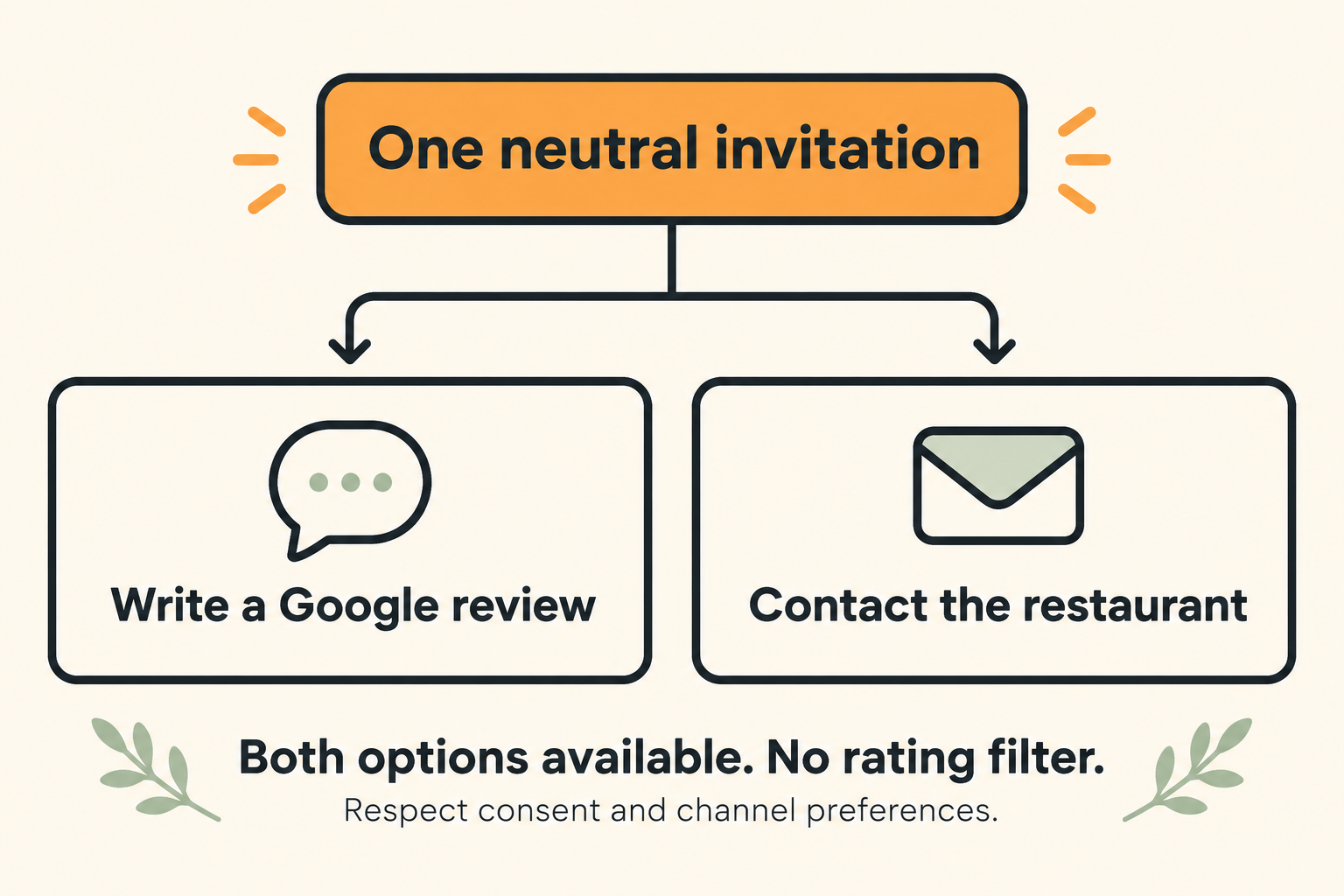
Illustrative workflow: offer both choices without filtering by satisfaction or rating.
Make the request easy to notice and easy to decline
Start with one printed touchpoint, such as the receipt or a small sign near the exit. Too many signs can compete with the information customers need to collect an order or find a table.
Example printed invitation
Would you like to share your experience? Scan to leave an honest Google review. It’s optional, and we welcome your feedback.
Place your verified review QR code beside that wording. The illustrations in this article are conceptual, not scannable review codes.
Example in-person invitation
If you’d like to share your experience, there’s a Google review link on your receipt. No need to do it now.
Ask a colleague to read the printed wording without explanation. Can they tell what the link does and which location it belongs to? If you serve guests in more than one language, make the invitation readable for those guests rather than adding extra instructions at the counter.
For a café with many repeat visitors, keep the invitation available without asking the same regular every morning. Include the wording in your staff handover notes so a shift change does not create a different process.
Check your Canadian outreach rules before automating
Before sending review requests by email or text, have the message, links, recipient list, and consent basis reviewed for Canada’s Anti-Spam Legislation. A phone number collected for an order is not automatic permission for unrestricted marketing.
Whether a message is commercial depends on its content and context; do not assume every review request is exempt or that every request is covered. For commercial electronic messages, the CRTC identifies consent, sender identification, and an unsubscribe mechanism as core requirements. Keep relevant consent records and honour unsubscribe requests when applicable. See the CRTC’s CASL guidance.
This is operational guidance, not legal advice. Once the outreach is cleared, test it internally: check the location, destination, timing, and how recipients stop future messages. Avoid duplicating the same request across several channels.
Reply to the experience the guest describes
Give one person ownership of review replies, with a backup for days off. A manager should handle sensitive complaints rather than leaving a rushed team member to improvise during service.
Google recommends brief, helpful, conversational responses rather than promotional ones. Keep customer information private and move detailed problem-solving to a private channel. Its review-response guidance is a useful starting point.
Example response to a pickup-delay complaint
I’m sorry the pickup wait was frustrating. We’d like to understand what happened. Please contact us at [restaurant email] with the order details so our manager can look into it.
Replace the placeholder with a monitored business address. Adjust the response to what you actually know; do not claim you have fixed a problem before checking it.
A public reply should not become an argument about the order history. Record the issue internally, check it with the team, and decide whether a change is needed. For example, repeated confusion about collection could justify clearer pickup instructions on your website.
Build a small weekly review routine
A review process needs upkeep after the sign goes up. Set aside a short weekly check with a named owner:
- Test the customer path. Scan the printed code and confirm that each location still reaches its own review page.
- Read new feedback. Note unanswered questions and complaints that need an operational response.
- Check outreach. If you send approved messages, inspect failed deliveries, duplicates, and opt-outs.
- Choose one service improvement. Assign a person and a due date, then check the result next week.
Keep a simple log of when you changed the invitation, where it appears, new reviews, and recurring themes. Comparing similar weeks can help you spot changes, but it does not prove that a sign or message caused them.
Avoid judging the programme only by its average star rating. A broken pickup process still needs attention even if other customers leave positive reviews.
Check the rest of the customer journey
Before launching, confirm five things: the right location link, a tested printed code, neutral wording, an outreach review where needed, and a person responsible for replies.
Then check what a prospective guest finds after reading your reviews. Your hours, menu, website, and ordering destination should agree. Our guide to adding a restaurant ordering link to Google Business Profile covers that next step. You can also explore Menuro’s restaurant websites and SEO.
Want help putting the pieces together? Book a Menuro demo. Bring your current review workflow, the channels you use, your customer eligibility and consent requirements, and any multi-location needs. That gives the conversation a practical starting point.