
AI-generated illustration; not a photograph of a Menuro client.
A holiday catering order can look simple in an inbox: lunch for a team, a few party trays or coffee and pastries for a meeting. The work starts when someone has to turn that request into quantities, a production plan and a reliable handoff.
Before promoting your holiday menu, make the buying process clear enough that customers know what happens next and staff know what has actually been promised. Use this checklist to build a manageable preorder workflow, whether requests arrive through a website, phone call or email.
1. Separate an enquiry from a confirmed order
“Request a quote” and “Place an order” are different promises. Label the action accurately. A form submission should not imply that the kitchen has accepted the date or that payment has been collected.
For an enquiry, tell the customer who will respond, your realistic response window and what confirmation looks like. For an order, show the final quantities, fulfilment details and total before the customer commits.
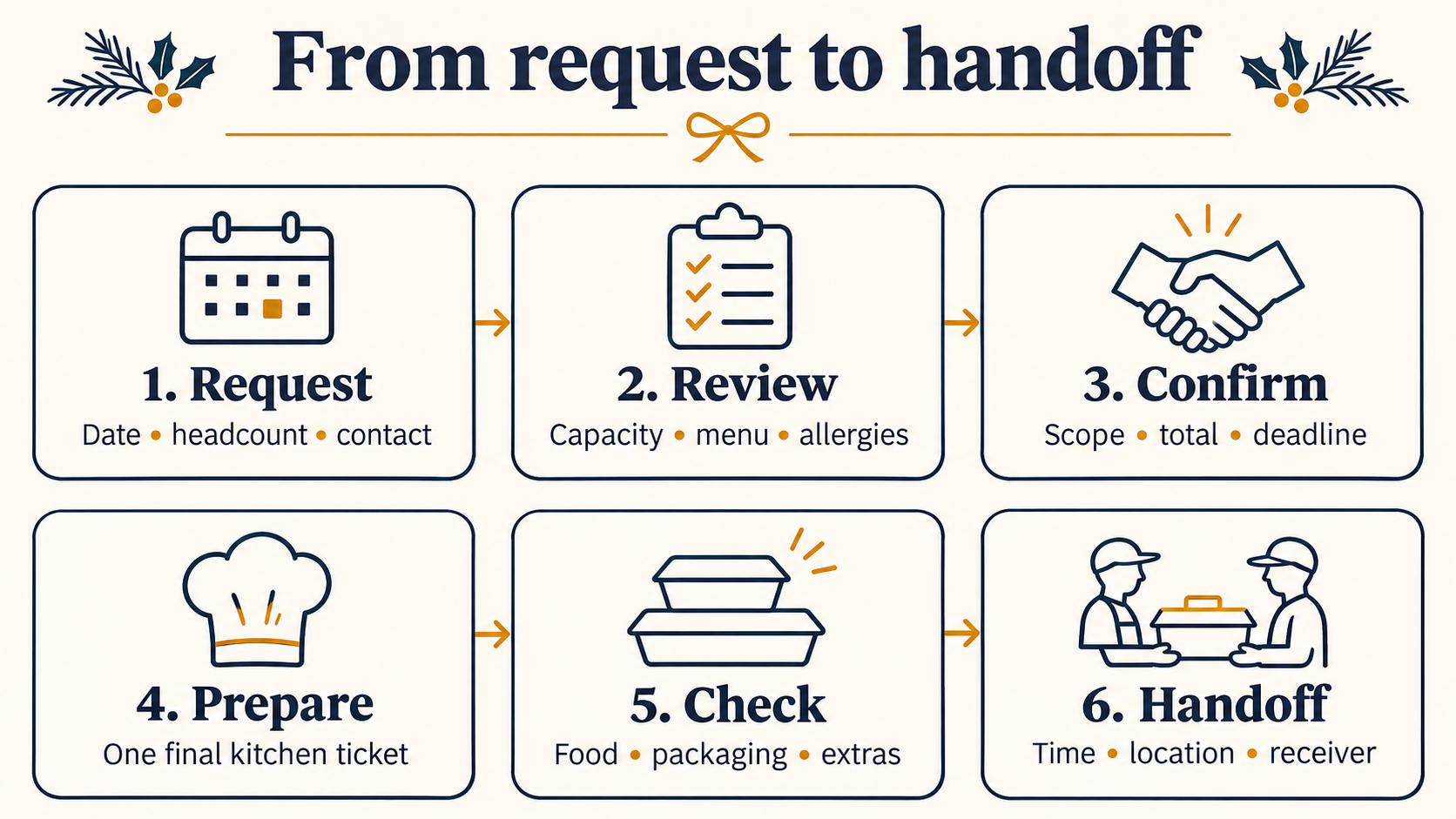
Keep one record for each request. A useful set of stages is: received, needs clarification, quoted, confirmed, prepared and handed off. Name one person responsible for moving it forward so two staff members do not send conflicting answers.
2. Build a catering menu around decisions customers can make
Start with a small selection your kitchen can execute consistently. For each platter, box or bundle, explain what is included and how it is sold. “Twelve pieces” is more precise than “party size.” If you describe a serving range, explain whether you mean a light snack or a main meal.
List available add-ons separately: drinks, utensils, serving equipment or extra sauces. Make substitutions and exclusions clear rather than relying on a conversation after checkout. Check the mobile version too: the customer should not need to zoom into a PDF to understand the offer.
If your everyday ordering menu also needs attention, start with the Menuro blog’s practical restaurant guides, then keep your catering requirements distinct from ordinary single-meal orders.
3. Set lead times from kitchen capacity, not a competitor’s menu
There is no single useful cutoff for every restaurant. Decide how much advance notice your ingredients, staffing and preparation actually need. A tray of sandwiches and a customized banquet are different jobs.
Map the busiest fulfilment windows before opening them to requests. Count the catering work already promised alongside normal service, then set a limit your team can honour. A capacity sheet can be enough to start; software does not remove the need for an owner of that sheet.
Publish the order cutoff, the deadline for final quantities and the process for requested changes. If a request falls outside those limits, review it before accepting it. Do not leave a large order sitting in a general inbox until the morning it is needed.
4. Route allergy requests to a responsible person
Ask about food allergies early, and make sure the information reaches the chef or manager. A free-text box is not a safety process on its own. Keep ingredient information current and discuss what your kitchen can safely accommodate before confirmation. Avoid promising an allergen-free meal unless your procedures support that promise.
Food Allergy Canada recommends advance communication, accurate ingredient information and procedures to prevent allergen cross-contact. Its catering guidance is a useful staff-training starting point, not a substitute for your own food-safety procedures.
5. Confirm the complete job in writing
Send one clear confirmation that replaces earlier drafts. Include:
- Customer and day-of contact details.
- Event date, headcount and exact item quantities.
- Reviewed dietary or allergy arrangements.
- Itemized charges, applicable taxes and the total.
- Payment status and any agreed remaining-payment deadline.
- Pickup or delivery window and the responsible receiver.
- Your agreed change and cancellation terms.
If anything changes, update that record and the kitchen ticket together. Do not ask the production team to reconstruct the final order from a chain of messages.
6. Plan the handoff before cooking begins
For pickup, specify where to go and who to ask for. For delivery, confirm the address, access instructions, receiver’s contact and whether the job is a doorstep handoff or includes setup. Check that the transport arrangement can handle the order’s size and timing; do not assume an ordinary delivery arrangement includes catering setup.
Use packaging suited to the food and journey, separate hot and cold items and check the packed order against the final ticket. Uber’s holiday catering playbook also recommends clear staging, suitable containers and a second check before handoff. Follow your applicable food-safety procedures throughout preparation, holding and transport.
A quick pre-launch test
Ask someone unfamiliar with your process to walk through a sample enquiry without submitting a paid order. Can they find the menu, understand the portions and locate the deadline? Can your staff explain who checks availability, who handles allergy questions and who confirms the order?
Then follow that sample internally. If a changed quantity or pickup time would get lost, fix the handoff before adding more enquiries.
Make direct ordering easier to understand
Menuro offers restaurant online ordering on your own website and app. If you are planning catering or group orders, bring your menu, cutoff rules and fulfilment requirements to a free demo. Confirm which parts fit your setup and which need a separate quote or staff-review process before you launch.
The goal is not simply to take more requests. It is to accept the right orders with clear expectations, then deliver exactly what your team confirmed.